

Super AgentTry Now
Super Agent
What is Genspark Super Agent?
Super Agent is Genspark's autonomous AI assistant that thinks, plans, and acts to complete your everyday tasks.
More than a chatbot
Instead of just answering questions, Super Agent breaks your request into steps, chooses the right tools, and carries the work through to a finished result — research, content, analysis, design, coding, communication, and more.
Works with the apps and tools you already use
Super Agent connects to your everyday apps and data so it can act with real context — pulling from your files, your connected accounts, and your SecondBrain to complete tasks the way you would.
What's New?
The new Super Agent is a major step up: stronger, faster, and sharper than ever, it now takes on the kind of work you'd normally hand to a whole team of experts.
Turn any workflow into a skill
Teach Super Agent a workflow once, and it's saved as a skill. Run it anytime, and share it with your whole team.
How to save a Skill: Just tell Super Agent directly — for example, "Save this workflow as a skill" — and the agent handles the rest.
Once saved, your Skill is ready to use in any future conversation. Explore the official skills library or learn more in our Help Center.
Here are two sample projects — click to explore each one:
Built for Complex Work
The new Super Agent handles long, multi-step tasks more reliably:
- Sharper on long-running tasks. It reasons through every step without losing the thread. Start it, close your laptop, and come back to finished work.
- Work in parallel. Run several tasks at once in a single project, and let each one build on the others' results.
- Bigger files. Up to 500 MB on the free plan and 1 GB each on paid plans — or pull them straight from Google Drive, AI Drive, and more.
Classic Super Agent vs. the New Super Agent
| Classic Super Agent | New Super Agent | |
|---|---|---|
| Environment | No dedicated cloud machine | Dedicated sandbox environment: real browser, own filesystem, and powerful execution |
| Reusability | Re-describe each task | Save any workflow as a reusable skill |
| Long tasks | Handles multi-step tasks primarily in sequence. | Sharper and more reliable, checks own output and build on earlier progress |
How to Use Super Agent
Navigate to the Genspark homepage and enter your prompt in the central chat box, or select Super Agent from the "New" menu in the sidebar.
What to ask: Describe any task — research, content, data analysis, design, coding, communication, and more. Super Agent coordinates the right agents and tools automatically.
Try these examples
Read more context
- Give me a weekly recap from this week's meeting notes — wins, decisions, blockers, next steps.
- Use my last product launch deck as a template and create a new one for the November feature release.
Turn workflows into skills
- Run a comprehensive industry analysis using Porter's Five Forces framework, then save the workflow as a reusable skill.
- Score a customer's renewal risk from their recent emails, tickets, and usage — save as a skill.
Research & Analysis
- Explain the differences between Web3 and traditional web applications in simple terms
- Research electric vehicle market trends and create a 10-slide presentation with key insights
Data Analysis & Visualization
- Analyze the sales data from my uploaded file and build a category analysis with charts and an average-order-value table
Coding & Development
- Create a product landing page for my smart water bottle based on the uploaded product brief
Image & Video Creation
- Create four different style birthday posters for my friend Vivian's 30th celebration
Communication & Coordination
- Draft a professional email to schedule a marketing meeting about the New Year campaign (Connect Gmail or Outlook first to enable sending)
Download to AI Drive
- Download 10 influential 2024 research papers on solar energy and save them to my AI Drive
Files & Sessions
In New Super Agent mode, files the agent creates or works with are kept in the workspace for the duration of your session, so it can build on them across multiple messages.
Anything the agent delivers (the file cards you see in chat) is saved with your project and stays downloadable.
💡 If there's something you want to keep, ask the agent to deliver it rather than leaving it in the working environment.
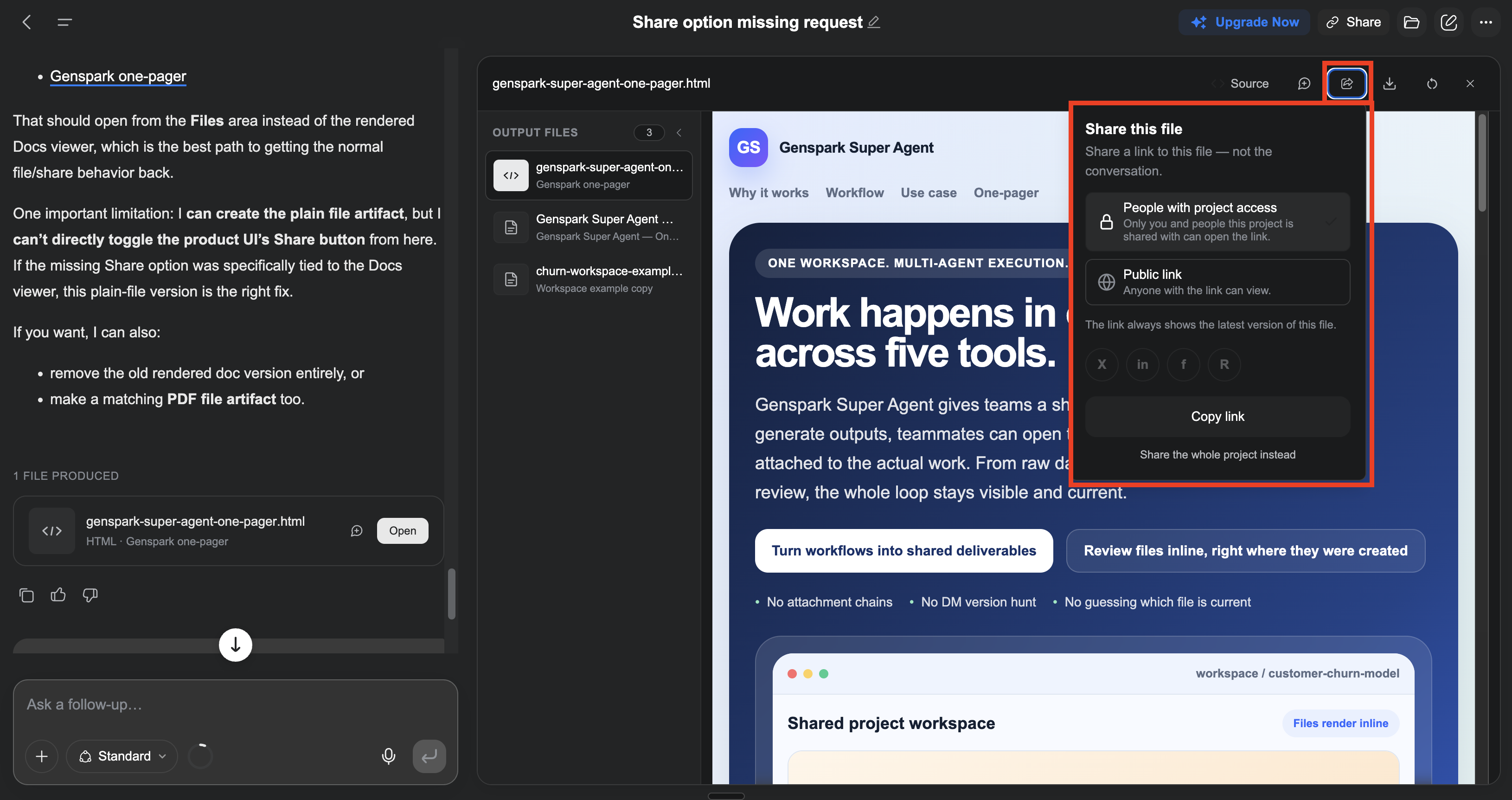
Share files individually: you can now share each delivered file on its own, separately from the conversation — so you can send a single file to anyone without sharing the whole project.
FAQ
Does New Super Agent use more credits?
Not because of the mode itself. A New Super Agent task can use more credits overall because it does more — multi-step work, live browsing, running code, and more tool calls.
To keep credit use low:
- Choose a lower model tier when you don't need maximum power.
- Nail the prompt in AI Chat first. Use AI Chat to shape and refine exactly what you want, then hand the finished prompt to Super Agent — so it executes cleanly instead of spending credits on back-and-forth clarifying steps.
Was this article helpful?